Exporting Animated Sequences
Animated sequences can be exported either as a video file or as a frame sequence that contains a series of images saved in the PNG file format. The recording options, which are available in the Export Animation dialog, also allow you to select the dimensions for the exported file, as well as the start and end times.
Export Animation dialog
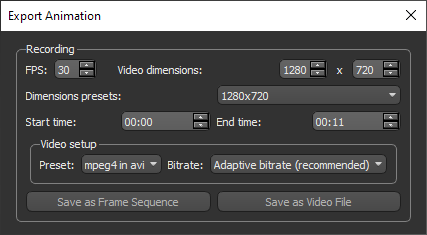
The following options are available for recording animation sequences.
| Item | Description |
|---|---|
| FPS |
The FPS (frames per second) setting determines how many unique consecutive images are displayed per second in a video to give the illusion of movement. It also determines the number of images in a frame sequence and is calculated as FPS*duration.
The FPS is selectable from 1 (lowest quality) to 120 (highest quality). At around 25 frames per second, the typical film rate that often gives a cinematic feel, is where most human eyes are fooled into perceiving motion. However, this is not a standard. If your video has very limited and slow transitions, you can maintain quality at frame rates as low as 5 FPS. On the other hand, large shifts between pure white and pure black can have a perceivable fault below 30 FPS. You should note that footage of video games can often require 60 FPS and more to maintain smoothness. In cases in which you need to lower the bitrate, you may have to choose a lower frame rate. Like most settings, it is best to play around with the encoding to find a setting that looks best for your video. |
| Video dimensions |
Determines the dimensions of exported file in pixels. Resolution is selectable up to 4096 by 4096 pixels.
Note Ultra-high definition (4K) is 3840 by 2160 pixels. |
| Dimensions presets | Provides a number of standard dimensions in the 4:3 and 16:9 aspect ratios. |
| Start time | Determines the point at which encoding of the animated sequence will start. |
| End time | Determines the point at which encoding of the animated sequence will end. |
| Video setup |
Lets you choose a file format in which the video file will be saved and a bitrate.
Preset… Determines the file format in which the video file will be saved and the codec that will used to encode the file (see Video File Presets). Bitrate… Determines the bitrate, which is a measurement of the number of bits that are transmitted over a set length of time (see Bitrates). |
| Save as Frame Sequence | Lets you save the animation as a frame sequence (see Exporting Animated Sequences as Frame Sequences). |
| Save as Video File | Lets you save the animation as a video file (see Exporting Animated Sequences as Video Files). |
 Video File Presets
Digital video formats can be confusing because most video files consist of two separate elements — the container and the codec(s) used inside that container. Containers typically describe the structure of the file: where the various pieces are stored, how they are made (interleaved), and which codecs are used. ASF, AVI, and MPG are container formats and can be encoded using a number of different codecs. Codecs serve two purposes: they tell your computer how to encode (or compress) a video file when you save the file, and they tell your computer how to decode (or play) the file when you open the file. Since the same codec is needed to both compress the file and play the file, the choice of which codec to use is extremely important. If the codec you use to compress your file is not installed on your user's computer, your user will not be able to play the video.
| Item | Description |
|---|---|
| Auto (*.mpg) | Saves the animated sequence in the MPEG4 file format. Though they are compressed, MPEG files maintain most of the original quality of an uncompressed movie. This is why many videos on the Web, such as movie trailers and music videos, are often available in the MPEG format. |
| MPEG4 in AVI (*.avi) |
AVI, short for Audio Video Interleave, is one of the most commonly used video formats and was designed by Microsoft to store both audio and video data in a standard package that allows simultaneous playback. While some formats can only contain a certain kind of compression, an AVI file may carry audio/visual data in almost any compression scheme, including MPEG4, Full Frames (Uncompressed), Intel Real Time Video, Indeo, ClearVideo / RealVideo, QPEG, and others.
The MPEG4 codec available for the AVI output format usually provides a good quality compression that produces manageable files for use on both desktop players and on the internet. Note AVI formatted movies can be played with any media player that supports the AVI file format. Microsoft Windows are usually configured so that double clicking an AVI file will open an application known as Media Player. This application can play AVI files, as well as other multimedia data types. On the Mac platform, Apple’s QuickTime 3 Pro includes a QuickTime Internet Plug-In that can play AVI video files. |
| WMV in ASF (*.asf) |
ASF (Advanced Systems File or Advanced Streaming File) and WMV (Windows Media Video) were developed by Microsoft to handle all types of video content and are part of the Windows Media framework.
The WMV format is a derivative of the MPEG4 format. However, it's more efficient than MPEG4 in encoding video and allows decreased file sizes while retaining watchable quality. Note WMV is generally only supported by Microsoft products. |
Bitrates
This parameter determines the bitrate, which is a measurement of the number of bits that are transmitted over a set length of time, and is computed in Dragonfly’s Movie Maker as:
bitrate = [(width * height * FPS) * motion factor * constant] / 1000,
in which the motion factor varies on the selected quality and the constant is 0.15
Although higher bitrates generally result in better video quality, they will increase file size dramatically. You should choose a bitrate that is suitable for the amount of motion included within your animation.
| Item | Description |
|---|---|
| Adaptive bitrate | The motion factor is set to 4 for this setting, which should be suitable for most videos. |
| High bitrate | The motion factor is set to 6 for this setting, which should be suitable for videos with high motion. |
| Medium bitrate | The motion factor is set to 2 for this setting. |
| Low bitrate | The motion factor is set to 1 for this setting. |
Exporting Animated Sequences as Video Files
Before you export an animated sequence as a video file, you must decide which format — ASF, AVI, or MPEG — is best suited to your needs and targeted distribution. You should also decide how large you want the video to appear without any loss of quality.
- Click the Export Animation
 button at the top left of the Movie Maker panel.
The Export Animation dialog appears.
- Select the settings for the recording — FPS, Video dimensions, and the Start and End times.
Refer to the table for information about setting these parameters.
- Select a preset for your video file (see Video File Presets for information about choosing a file format and codec).
- Select a bitrate — Adaptive, High, Medium, or Low, as required (see Bitrates for information about the available bitrate settings).
- Click the Save as video file button.
- Choose a File name in the Export as Video File dialog.
- Save your animation.
During rendering, the canvas will be resized to the selected dimensions or aspect ratio. If you notice any unwanted clipping or extra space during this process, you many want to cancel and then re-select the video dimensions.
Exporting Animated Sequences as Frame Sequences
When exported as a frame sequence, your animation will be saved as a series of PNG images.
- Click the Export Animation button at the top left of the Movie Maker panel.
- Select the settings for the recording — Dimensions and the Start and End Times — in the Export Animation dialog.
Refer to the table for information about setting these parameters.
- Click the Save as frame sequence button.
- Choose an output folder in the Select Output Directory dialog.
File names will be assigned automatically to each image in the sequence.
- Save the frame sequence.
